Velosity Credit Card Processing
Velosity enables secure, multi-tenant credit card payment workflows by integrating with PCI-compliant processors. This architecture ensures sensitive card data is never stored or processed by Velosity, while supporting flexible, audit-friendly payment operations.
Overview
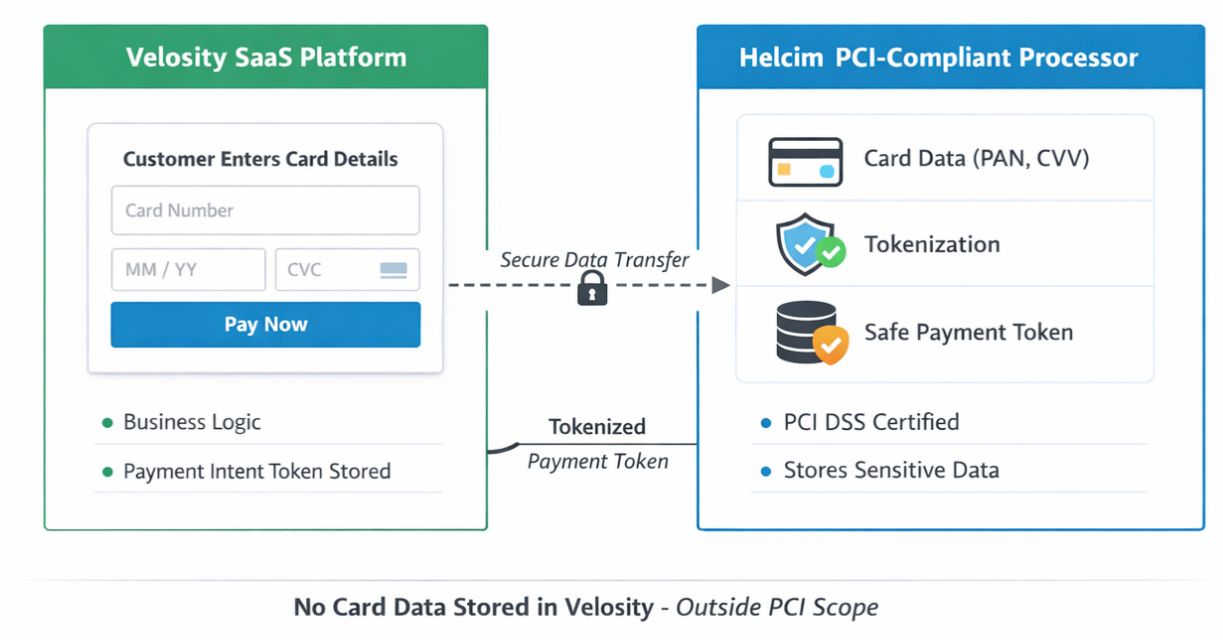
- Customers enter credit card details directly in Velosity’s UI.
- Card data is securely posted to a PCI-compliant processor (e.g., Helcim).
- Velosity receives a tokenized payment method or payment intent ID.
- Only non-sensitive metadata (last-4 digits, brand, expiration) is stored.
- Payments can be captured immediately or deferred until shipment.
Supported Processors
Velosity supports integration with the following processors:
- Helcim
Each processor is PCI DSS certified and supports PCI compliant tokenization flow for safe transactions.
Sales Quote checkout
Credit-card payment is selected and completed from an ACCEPTED Sales Quote when Payment Required and Allow Credit Card Orders are enabled. Card fields are tokenized by Helcim; Velosity receives the resulting token and never stores the card number or CVV. The quote shows the payment status while the processor confirms the transaction. See Payments and Checkout.
Multi-Tenant Support
- Each tenant can configure their own payment processor
- Velosity routes payment requests based on tenant configuration
- Tokenized payment methods are stored per tenant for deferred charging
- Payment method visibility and UI options are scoped to tenant capabilities
PCI Compliance
Velosity is designed to minimize PCI DSS scope by offloading all sensitive card handling to certified processors:
- Card entry occurs in Velosity, but sensitive fields are posted directly to the processor.
- Velosity never stores or transmits raw card data (PAN, CVV).
- Hosted fields or tokenization flows ensure sensitive data bypasses Velosity.
- Strict API boundaries prevent ingestion of sensitive fields.
- Only safe tokens are stored (e.g., payment intent ID, last-4, brand).
- All PCI obligations (storage, transmission, compliance) are handled by the processor.
- Velosity logs only safe metadata, preserving auditability.
Data Flow Diagram
Steps to Setup (ADMIN)
- Sign up for a Helcim account. Enter bank information to support transfer of funds from Helcim to your bank.
- Configure the Helcim Integration in Velosity with your Helcim credentials (Setup > Integrations). See Helcim Developer Docs for more information.
- Select Helcim as the active processor in CPQ Settings, enable Allow Credit Card Orders, and enable Payment Required when checkout is required before creating the fulfillment order.
- Process a test transaction using the Helcim defined test credit card numbers.
Development and DEVOPS Testing
- Use a Helcim sandbox merchant account for local development, DEV, QA, and automated DEVOPS testing. Never use production credentials outside production.
- Prefer a dedicated sandbox account under the same Helcim organization as the production SaaS account. This keeps administration centralized while isolating credentials, test transactions, and permissions.
- Configure the Velosity Helcim integration with Environment = SANDBOX, then use the sandbox account ID and API token supplied by Helcim. Arbitrary placeholder credentials can display the card form but cannot complete Helcim tokenization.
- Keep production credentials in production-only configuration. Do not commit either sandbox or production API tokens to source control.
Summary
Velosity’s credit card processing model ensures secure, scalable, and compliant payment handling across tenants. By leveraging tokenization and certified processors, Velosity maintains a minimal PCI footprint while supporting flexible payment workflows.