Developers
Items
Each Item can optionally have a Country of Origin specified. Countries can be retrieved using these endpoints:

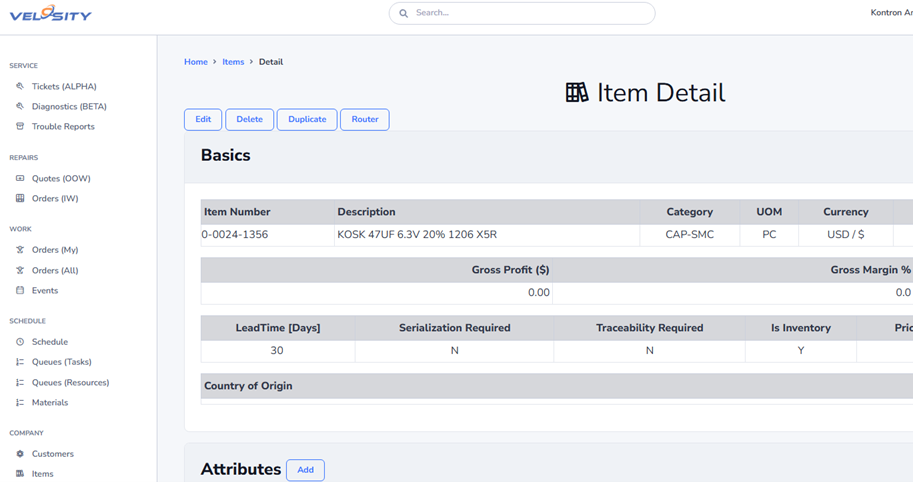
Item Detail
Lifecycle and availability
An item's lifecycle and availability are separate concepts. Integrations can send and update both values to retain the business context of an item's product life and whether it may be selected for new work.
| Property | Values | Purpose |
|---|---|---|
LifecycleStatus |
Planned, Active, Sunsetting, EndOfLife, Retired |
Describes the item's position in its product life. |
AvailabilityStatus |
Available, Limited, Restricted, Unavailable |
Describes the current selection or supply condition. |
AvailabilityEffectiveUTC |
UTC date and time | When the availability decision takes effect. |
AvailabilityReason |
Text | Explains the availability decision. |
SuccessorItemID |
Item ID | Identifies a replacement catalog item when one exists. |
StatusUpdatedUTC |
UTC date and time | Records when lifecycle or availability data last changed. |
IsActive remains a separate legacy catalog field. It continues to support active/deleted catalog behavior and is not calculated from LifecycleStatus or AvailabilityStatus. Send the lifecycle and availability values explicitly; do not infer one from the other or from IsActive.
For example, an item in Sunsetting lifecycle can remain Available while existing demand is supported, or be Limited for a last-time buy. An EndOfLife item commonly has Unavailable availability and a SuccessorItemID, but those values are stored independently.
Filtering and views
The Items list accepts lifecycle and availability filters independently. Each filter is an exact value match; omit it, or send an empty value, to include every value for that criterion. When both filters are supplied, the list returns items that meet both conditions. The selected filters are retained for the list session.
The item list is intended to find items by these values. Item detail responses and the Items detail view include LifecycleStatus, AvailabilityStatus, AvailabilityEffectiveUTC, AvailabilityReason, SuccessorItemID, and StatusUpdatedUTC, so consumers can show both the short status and its effective date, reason, and replacement item. AvailabilityReason is shown in the detail view rather than the list.
Item Compatibility
Item compatibility is managed through the ItemCompatibilityController.
Routing
The feature uses a structured routing pattern where the action verb is typically at the end of the URL:
- List/Detail:
/Items/{BaseItemID}/Compatibility/Detail - Add:
/Items/{BaseItemID}/Compatibility/Add - Relationship Detail:
/Items/{BaseItemID}/Compatibility/{CompatibilityID}/Relationship - Edit:
/Items/{BaseItemID}/Compatibility/{CompatibilityID}/Edit - Delete:
/Items/{BaseItemID}/Compatibility/{CompatibilityID}/Delete(POST) - Search:
/Items/Compatibility/SearchItems(used for AJAX searching)
Implementation Details
- POST Actions: The Add and Edit POST actions accept individual parameters (
CompatibleItemID,CompatibilityType,NewNote) rather than a complex view model, simplifying model binding and front-end implementation. - Search: The item search functionality uses a restricted result set (max 50 items) for better performance and usability.